Open source · runs on your own server
A wiki with tasks that you, your team and your AI assistants share.
Zone is a wiki and a task manager in one, kept as plain files in git. Your assistants search, read and write them over MCP, and every change they make is a commit you can review or undo.
Sign in to the demo as demo with the password zonewiki-demo.
- Plain files, no lock-in
- Full history
- AGPL open source

Why Zone
Your notes, readable by you and by the assistants you trust.
An assistant is only as good as what it can find and keep. Zone gives it a real place to work, and gives you a record of everything it did.
Your assistants work in it
Over MCP an assistant can do what you can: search, read, create, edit, rename and restore pages, file notes and manage tasks. Each change lands as a commit marked (MCP).
Your pages stay plain files
Markdown in folders, tasks as JSON next to them, history in git. Open the folder in any editor, grep it, push it anywhere. Stop using Zone and everything stays as it is.
Nothing gets lost
Every page has its history: see what each save changed, open any version, restore it in one click, bring back a deleted page. Renaming a page updates every link to it.
Search that finds things
Fuzzy names, full text with stemming and typo tolerance, exact phrases, tags and dates. The page opens at the matching section. Your assistant searches the same way.
A real task manager, built in
Not checkboxes in a page: a board to plan your days, lists, repeating tasks, assignees and comments. Tasks link to pages and pages show their tasks, so it can be the task app you now run beside your notes.
Made for teams too
Each person has a login, a role, and private pages and tasks. Assign a task and it shows up in their My tasks. Every change is committed in the name of who made it, their assistant's too.
With your assistant
Connect once. Every session starts where the last one ended.
-
Get a wiki
Run Zone on your own machine or server: one binary or one container, no database.
-
Connect your assistant
Give it your wiki's address,
https://wiki.example.org/mcp. In Claude, ChatGPT or Claude Code you sign in to your wiki and click Allow. Any other MCP client that connects over HTTP uses a token. -
Tell it your conventions
Write them on a page called
wiki-guide: where things go, what's private, how pages are tagged. Zone hands it to the assistant every time it connects.
You stay in control. When you connect an assistant you choose what it sees (the shared wiki, your private pages, each of your groups) and whether it may change anything or only read. Each person connects their own, so the history shows whose assistant changed what: undo one change with a click, or everything an assistant just did in one go.
Tasks
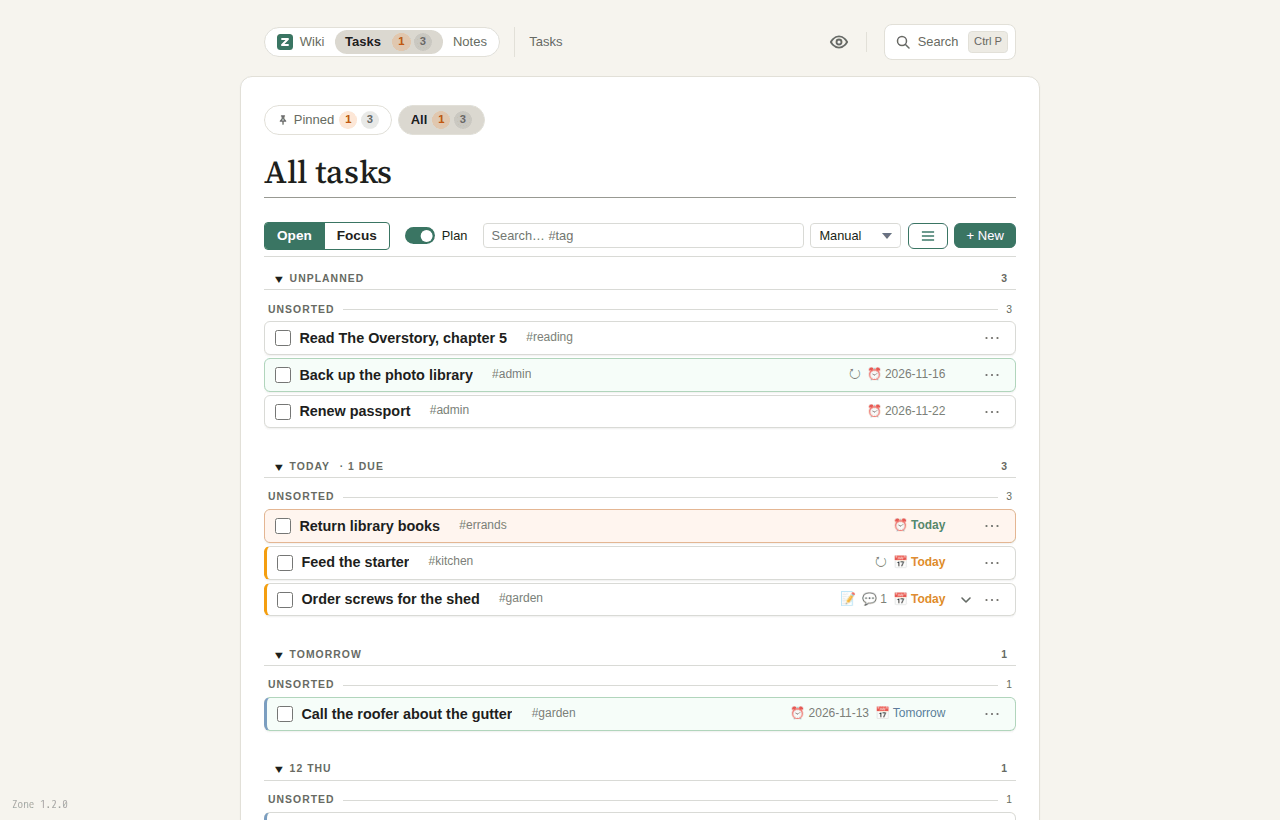
Plan the day you'll do it, not only the day it's due.
A task manager in its own right. Every task has a start day and a deadline: drag tasks onto the coming days on the plan board, and see what's on in Today.
- Quick add:
Call Bob tomorrow #work due:fri - Repeating tasks, and lists like groceries that come back
- In a team: assign tasks, comment and
@mention, with news by mail if you want it - Turn a page's action items into tasks, and show a project's tasks on its page
Everywhere
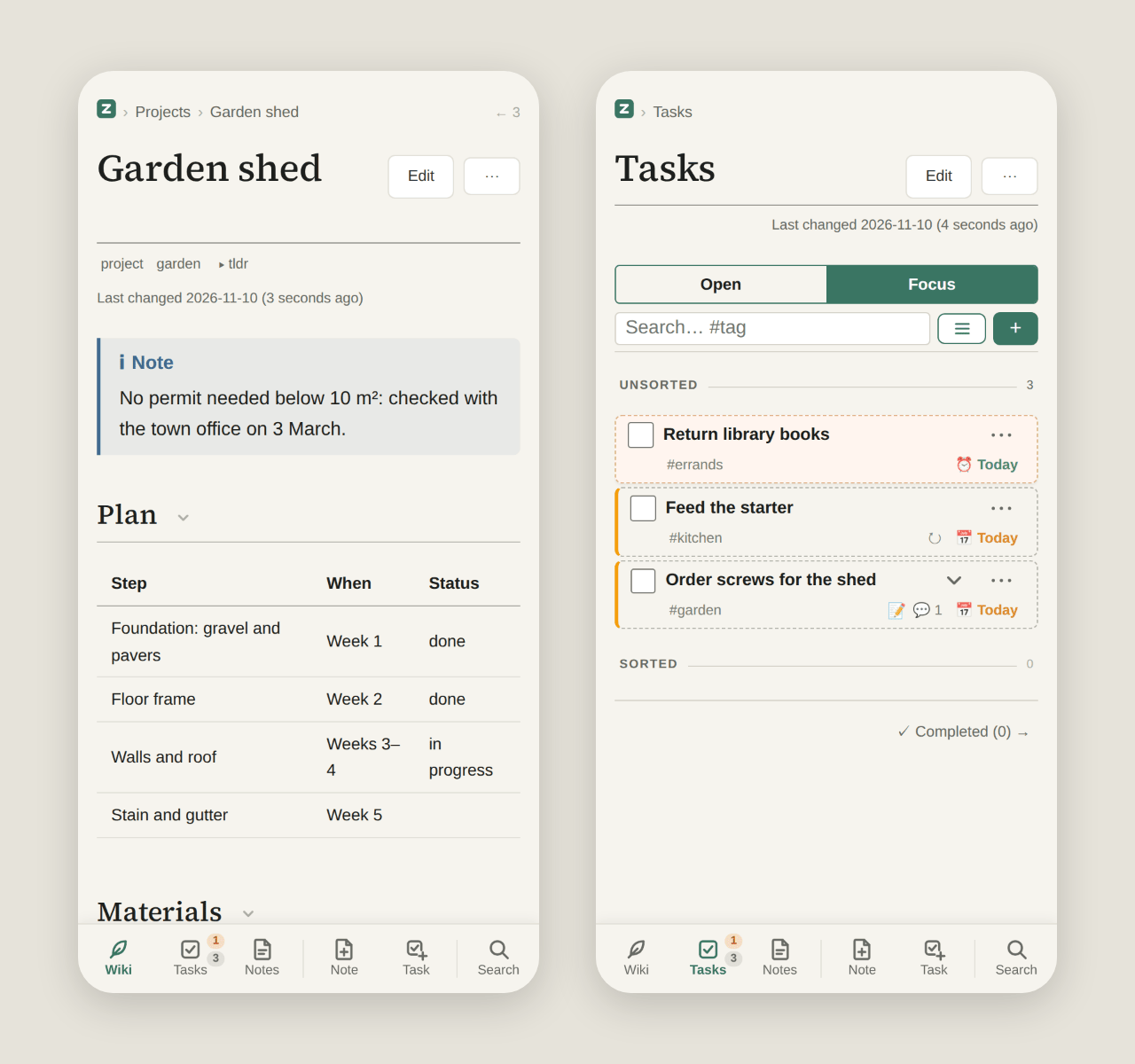
On your phone, the same wiki.
Read, edit and tick off tasks on the go. Add Zone to your home screen and it opens like an app.
- A tab bar for wiki, tasks, notes and search
- Swipe to plan, long-press to drag
- Several people? Each gets a login and private pages
Try it or run it
Look around first, then make it yours.
The demo is a real Zone with pages, tasks and notes to play with. Your own runs from one file, and your wiki is a folder of Markdown in git.
The live demo
demo.zonewiki.org
Sign in as demo with the password zonewiki-demo.
- Edit pages, plan tasks, write notes
- Undo what an assistant changed, in Changes
- Diagrams, math and a page's full history
- Everyone shares the one account: write nothing private
- Put back at every full hour
On your own server
Open source
Under the AGPL.
- One binary or one container, no database
- Runs on your machine; nothing loaded from other hosts
- Users for a team or a household, each with private pages
- Optional semantic search with a local model
- On a laptop, a NAS or a server
Questions
Good to know
Is Zone free?
Yes. Zone is open source under the AGPL, and you run it on your own machine or server.
Which assistants work with it?
Claude (web, desktop and mobile), ChatGPT and Claude Code connect by signing in to your wiki. Any other MCP client that connects to a server over HTTP can use a token. Each person connects their own assistant, and it acts as them.
Where is my data?
Where you put it: a folder on the machine that runs Zone. Zone needs no outside service and sends nothing anywhere on its own. Only the demo is on our server, and what you write there is public and gone at the next full hour.
Can I leave?
Yes. Your wiki is plain Markdown in a git repository on your own disk: it opens in any editor, and its history in any git tool, with or without Zone.
Can several people use one wiki?
Yes, a team or a household: each person gets their own login, private pages and tasks, a task can be assigned to a person, and their changes are committed in their name. One wiki holds up to about a hundred people; single sign-on and two-factor login aren't there yet.
Who makes Zone?
One developer in Austria, in the open. Questions and ideas are welcome on GitHub or at support@zonewiki.com.